
Behind the scene of creating a great LLM chatting application
It's true that all chat applications do not have good UI/UX. And for someone like me, who deeply appreciates great engineering work and well-crafted UI, it's a shame.
I used T3.chat for a few months, and to be honest, it's a great product. I'm not a huge fan of the purple color scheme, but I stuck to it because the boring theme is really ugly. I was using it for the UX anyway.
The chat is fast. When you create a message, everything loads instantly, you don't have weird spinners or nonsense interactions. The app feels good, and this is what adds AI into my day-to-day workflow.
After some time using T3.chat, I noticed some UX quirks that bugged me a little. The biggest one is the lack of keyboard shortcuts. To create a new chat, you need to use the very bad CTRL-SHIFT-O shortcut made by ChatGPT, not to mention all the other interactions such as changing models or adding tools, which are mouse-only. All of the navigation on T3.Chat is really designed for mouse and click interaction, as I prefer to have a keyboard-only navigation.
And over the weeks, many other little quality-of-life changes made me want to create my own chat app.
So that's why I tried to recreate a chatting app all by myself. It was a personal challenge, and also a way to try the new AI technologies.
So the MVP for karnet.app was simple: I wanted to recreate a very simple chat interface where I can ask any models questions, in any modality. Also wanted to be able to change the question’s model, and to fork the conversation to another chat.
And of course, I wanted to make all of the application keyboard-first. Every interaction needed to feel fast (feeling and actual speed are very different things in UX; of course I want every API endpoint to be as fast as possible, but primarily, I want the application to be/feel fast).
In summary, here are the requirements of the MVP
- All LLMs available, great token speed and resumable stream
- Replay and try another model features
- Very fast application (interaction time budget is <25ms)
- All navigation should be possible and optimized for keyboard-only users
After 4 weeks of constant grind in my 5 to 9, I finally landed a version of Karnet.app chat I’m proud of.
Before going in depth into all the technical challenges I encountered on this journey, I want to demo what I built. I use this chat application every day for my normal LLM chatting sessions. The application is stable, and I enjoy playing with it!
Karnet is really built for speed. When you use mostly keyboard to navigate in an application, everything needs to render fast, otherwise, that app feels really slow.
Karnet feels very fast because most of the data you see on screen has been loaded before you click on it. Some of the data is pre-loaded by calling our API, some of them are stored on the client device. For example, all the LLM chats are loaded on the client, making them instant load.
I tried to make Karnet loader-free.
All of the interactions in the chat are available through multiple keyboard shortcuts. Everything is thought to be easily accessible without using a mouse :
- changing the model
Mor@(inside of the chat input) - adding / removing tools
Sor/(inside of the chat input) - creating a new chat
c+c(create chat) - scrolling in the page
j or Jandk or K - replaying last message
up(like in the terminal) - many more…
I want the keyboard navigation to be the main navigation in the app. Everything should be accessible a few keyboard shortcuts away.
For example, let's imagine you have a research paper from last year on your computer and you want to have an update on the state of research on this topic, you could do cc to create a chat, /file to add a file to the request, then s to add the search tool and then Enter to launch the request. All of this without having to touch the mouse.
This way of interacting should not be a premium, this should be as normal as the mouse interaction.
The chat renders beautiful markdown, even while tokens are streaming. It can also resume when the connection from your machine to our server is down (you will never have an empty screen).
You can also retry a question, in the same chat, using another LLM.
The chat is really nice. But honestly, I have very little to do with it. I use the latest AI libraries from Vercel (ai-sdk , resumable-stream and streamdown ). These libraries are very well built, the documentation is very precise. I think I spent less than a week on all the frontend chat features.
Thanks to openrouter all of the LLMs are available in Karnet. They are available to try as soon as OpenRouter releases them on their website.
Also, to avoid the mess of loading thousands of LLM models in the app model selection dropdowns, you can pre-select LLMs in the settings of the app. You can also select a default model for text generation and image generation.
I led by creating a new NextJS project, adding new pages, and tinkering with the ai-sdk and its integration through Vercel’s LLM gateway. The amazing documentation available online allowed me to have everything set up in a few hours and have the first version of this app ready and deployed in production very quickly.
At first, I wanted to create a sync engine all by myself, but I soon realized that it was a very hard problem, and I did not want to spend too much time outside of the core product.
That’s why I looked at all the different platforms / frameworks that allow you to create real-time syncing between React and your backend / database, and tried some of them.
In the end, Convex was the more mature one and the easier to deploy and to use, in my opinion. So I really started to create a perfect clone of T3Chat : and to be honest, the tech stack is quite magical ✨.
I think I’m using the same technologies as Theo and I'm pretty sure that we are doing the same tricks on the Next.js side to make everything lightning fast.
Having a basic chat interface is quite easy, but pushing it to the limit and having a very fast one is not simple.
Next.js is very good for SEO optimized websites : All of the React server component features allow you to create very fast static websites. All of the web crawlers can then load your website and index it without having to render the JS, this is perfect for e-commerce and landing pages.
When you want to create a website where the user is going to interact a lot with all the different pages, where data is changing all the time NextJS hits its limits.
One of the big problems is every time you navigate to another page on Next.js, you need to call Vercel's backend, this is how NextJS works. There is no client-side routing.
NextJS is taking a few milliseconds here and there, making everything seem laggy.
Keyboard navigation does not have the same standards as mouse interaction ones. I feel that when we click on something, a little wait can be expected. I don’t think our brain is wired to wait for keyboard inputs, when you press a key, something needs to happen. That’s why keyboard online navigation is so hard to get right.
This is Karnet before the client side optimization I did.
As you can see, each page change takes 200ms +. For a SPA this is not a great user interaction.
So I went looking for a solution to have Next and instant routing (like in SPA).
The most obvious solution would be to not use NextJS at all. NextJS is not really designed for client side interaction, when “normal” React is.
I’m forced to use Next on this project for two reasons :
- I want to have the landing page statically rendered using all Next features and I don't want to use a subdomain or subpath in my application. (I could host the landing page on `karnet.app` and have the application on
something.karnet.appor on `karnet.app/`something, but I did not want that) - I want to use the
/apifeature
Why?
The /api feature is a very great way to build full-stack apps easily. You just create an api folder in your /app folder, and then everything inside of it will be transformed into routes for your API. This feature is heavily undervalued : most of our applications are CRUD monkeys' applications, *as DHH would say*. The /api folder is AWS lambda but done right : I wanted to use it. This is simple. I love simple.
The solution I found was to use the React Router library inside of the Next.js application.
This is not easy to set up because Next is not really built for that. Nevertheless, Next has a very convenient feature, the “catch all routes” : you can create a folder with \[...slug\] as name. This will redirect all the requests not matching any other routes to this.
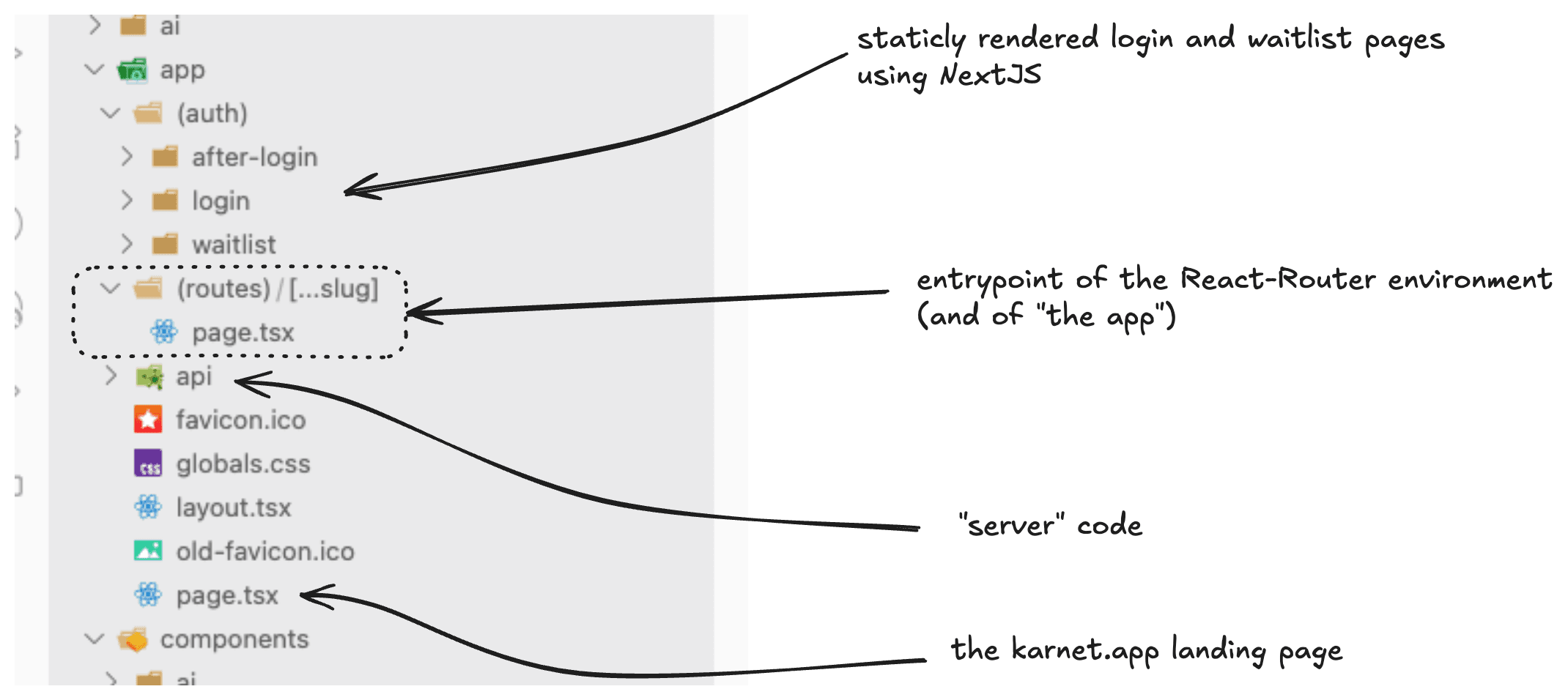
Using this strategy I’m able to split my application in two parts : the server-side rendered and the client side rendered.
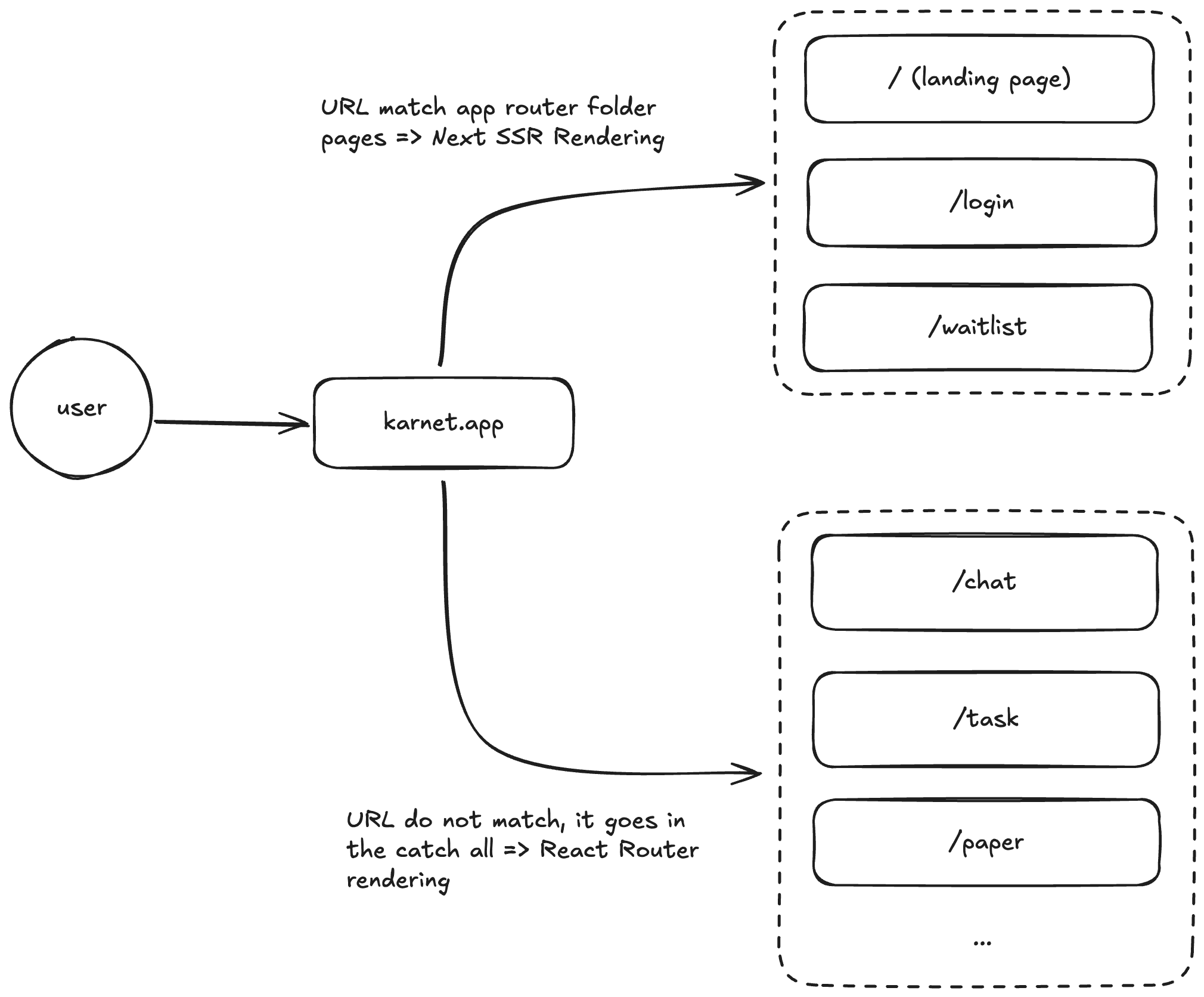
That's why my application has an /app and /page folders (you can read the source code here). The first is the “traditional Next application router” and the second is the SPA routing.
All of this makes navigation much smoother : most of the links are inside of react router’s world, so they are just triggering an unmount of the old page component, and then, the mounting of the new one (which is super fast).
This is the chat experience on Karnet. You can ask questions to any openrouter model, retry it on the same model, fork the question or retry it on another model. Everything is smooth, animated and beautiful to use. Using this chat app is effortless and really, a joy 😊
Getting responses from an LLM into a React application can be very difficult if you are not using the right technologies. Token stream, event serializing and deserializing and many other details are not trivial in those kind of applications. You could recreate the wheel, or just use the state of the art libraries. I chose simplicity and state of the art.
I went with the ai-sdk to create the chat. This is very easy to set up, you will encounter some challenges when loading data into the useChat hook.
But the real challenge comes when you want to optimize the TBLR (Time Before LLM Request). You cannot really change the token throughput of the provider (I’m using openrouter, so I always get the best provider for one LLM).
The only real impact you can have on your “TFT” (TFT is really the difference between the time when the request is sent to the LLM provider and when the first tokens are received) is to reduce all of the processing you do before sending the request.
Having a small TBLR means having a fast experience on the chat. Most of the time, everything is about design to disguise loading time, but for my app I want something really as fast as possible.
At the moment I’m not doing much processing (intentionally, because I want a very small TFT) before sending the request : I don’t use memory systems, complex LLM routing strategies or even AI agents.
The budget I set for myself, for now, is <100ms for all the processing I do before I send the LLM request (Time Before LLM Request). And at first, I had a horrible TBLR : it was more than a second.
To better understand where all of my TBLR was lost to, I used sentry.io to instrument my app.
Fun note : you can now install Sentry with an AI CLI. This CLI will make all the right choices for your app : it has worked perfectly for me and I didn’t change any of the generated code, gg sentry!
Here are the results I got.
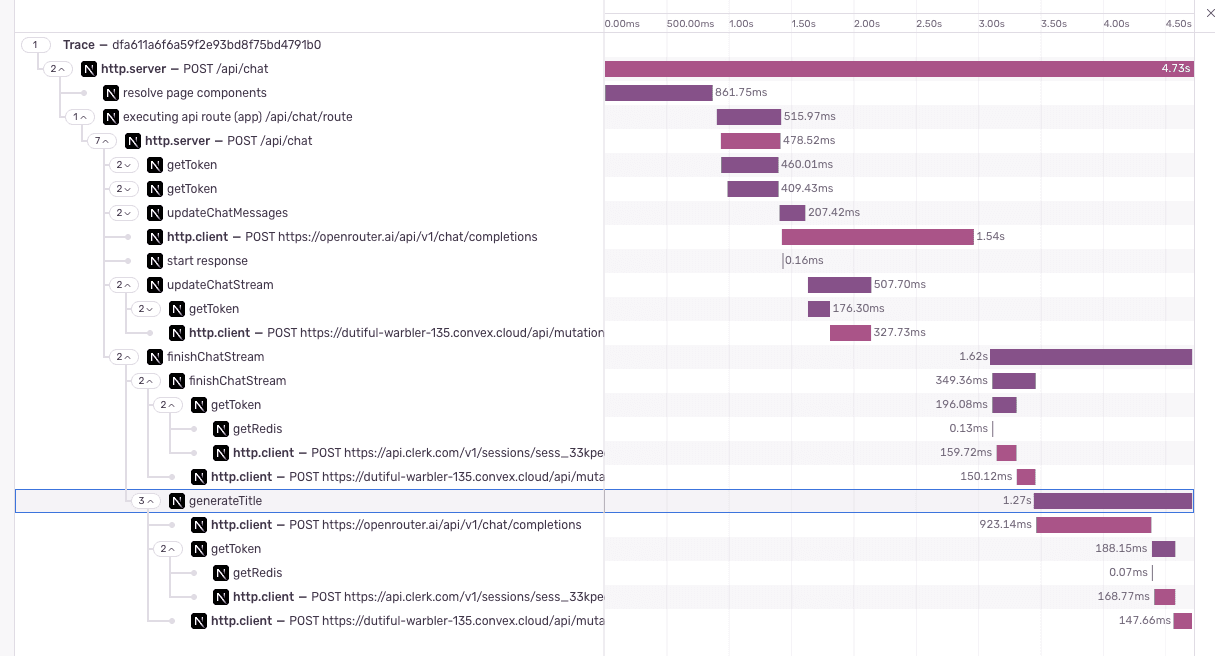
This is a “cold request” on the vercel-production environment. As you can see this is not great, the TBLR here is 1.5s… But I’m losing 800ms to Vercel internal routing (because my application is not loaded into Vercel Servers, the request takes longer : acceptable). The real shame was the 600ms I was losing due to token validation and generation.
I cannot reduce the Vercel “resolve page component” span, but I can optimize the getToken function. To do so, I set up a Redis cache, and cache all the getToken responses. This is slow for the first request, but very fast afterward.
Here is the same request, but once all the caches are hit :
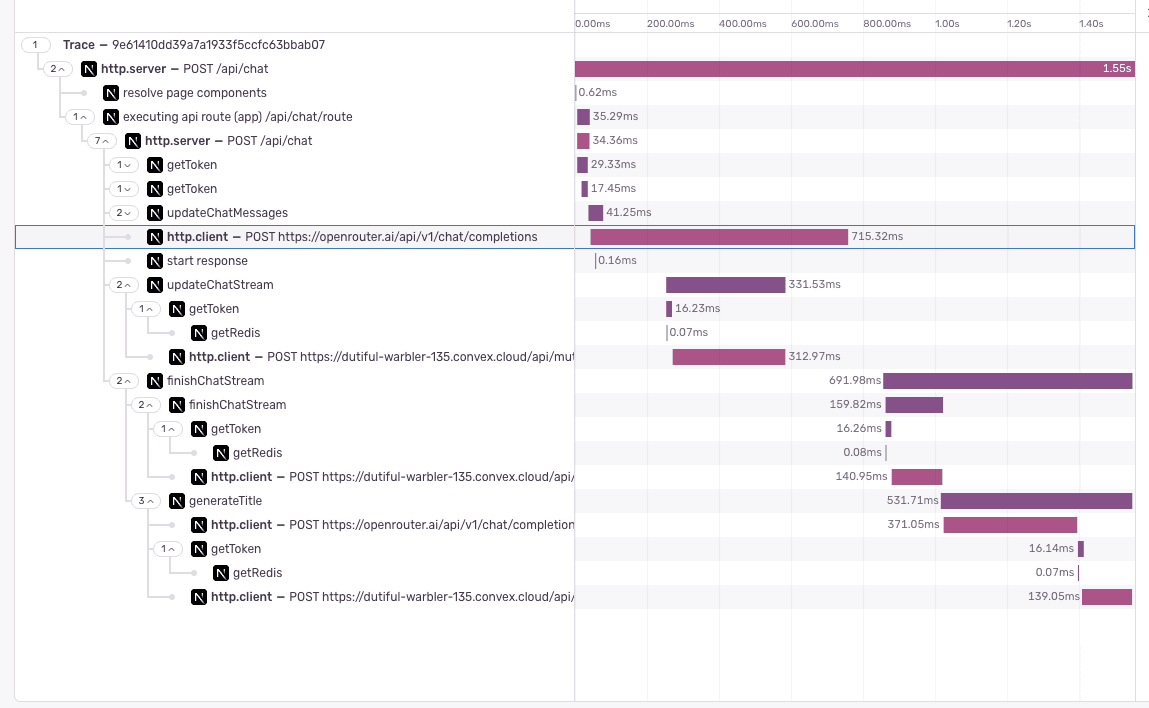
As you can see, here the request to Openrouter is sent in less than 50ms. Which is in my TBLR budget. This made a very big difference on the feel of the chat, because instead of having a spinner; you could get the token stream almost instantly, making the app feel faster.
I could completely remove these two waits if I was hosting all of the backend code on a non server-less environment and if I were using a different auth solution (avoiding the getToken request…)
As always, in software engineering you need to make tradeoffs. Here are my reasoning behind the two tradeoffs I’m doing :
The /api feature of Next JS is so great. Not having to think about any server, CI/CD, dev environment is really a game changer. When you push code to Vercel, you get a PR environment ready in minutes, there you can test your application “in the real world”, effortlessly.
In my day job, I’m managing a big AWS infrastructure running docker images inside a Kubernetes cluster (like everybody no?).
All of the work you need to do, to keep everything running, creating all of the pipelines, and just to get a worse developer experience in result is not worth it.
In a coming article I will explain all the hoops I needed to go through to have a great CI/CD for the software I’m building. Months of work, and I still don’t have PR envs...
I totally understand why Vercel needs cold start, especially since I’m a free tier user. I don’t think I will be moving anytime soon from this kind of development and off of Vercel.
The Convex / NextJS tradeoff is amazing for the CRUD / ai operations. For all the more complex requests, I use Trigger.dev. More on that in another article…
Most of the time spent in Clerk is when I call their server to generate a token in a special shape. This is needed because Clerk do not give you your private JWKS key (otherwise you could just bypass most of their features ahah). Clerk takes on average, ~200ms to return the token (on my account), this is a lot of time only to sign a JWT token.
I don’t really like this. But for now I’m accepting it because the developer XP is incredible and I’m still in the free tier. If I were to upgrade the tier, I think I would want to be able to sign my token on my end, meaning that I would want to have access to my JWKS (to avoid the request round trip, is it possible ?).
Using Clerk helps me not having to worry about most of the security, user management (and even the subscription part in the future if needed!). So, for now, I’m OK with the getToken situation. I found a work-around with the caching strategy. This is not perfect but it works.
The last piece of engineering I did to make Karnet fast was to avoid all the basic spinners you can find in a normal SPA app. Loaders and skeletons are the plague of any good software: they look ugly and make you lose time. When you click on a link you want to have the data loaded instantly.
Everything which should not have a spinner, should not have one. If you have a way to avoid it, follow this way.
The CRUD stack I’m using on Karnet is Convex and Tanstack query. Convex is hosting the data, doing their magic to make it up to date with the client, while Tanstack query is providing a nicer hook interface and enabling an easy first render with local data.
Karnet is not, yet, an application where you can collaborate. So you are the only one modifying the data. This allows me to store the data on your device without any major risk (server is always right, on conflict we replace local data with the remote one). I use local storage for this storage layer.
This would be a general “query” hook on Karnet :
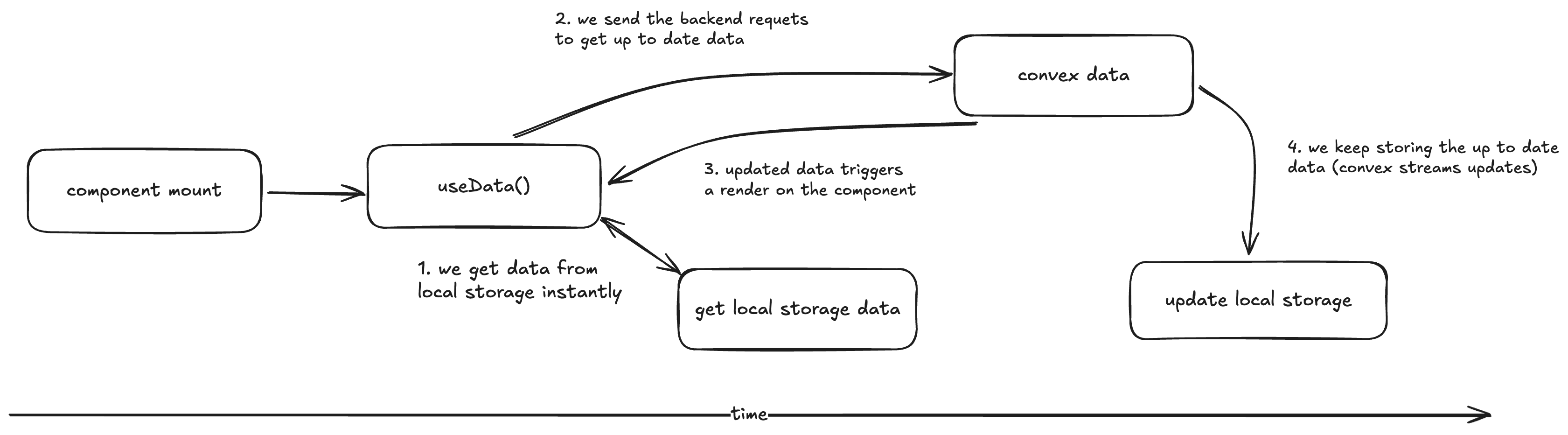
This hook tries to avoid loading state in the application. I prefer to render out of date data for a few seconds than to render an ugly spinner.
type UseSyncProps< ConvexQueryReference extends FunctionReference<"query">, Args extends FunctionArgs<ConvexQueryReference> | "skip",> = { args: Args; queryFn: ConvexQueryReference; key: (args: Args) => string; options?: { isLocallyStored?: boolean; };};export const useSync = < ConvexQueryReference extends FunctionReference<"query">, Args extends FunctionArgs<ConvexQueryReference> | "skip",>({ args, queryFn, key, options,}: UseSyncProps<ConvexQueryReference, Args>) => // useQuery from tanstack useQuery({ ...convexQuery(queryFn, args), initialData: () => { if (options?.isLocallyStored) { const rawData = localStorage.getItem(key(args)); if (rawData) { return JSON.parse(rawData); } } }, });This works very, very well. In the future I will add some parameters like from where the data is coming (to restrict interaction when the data is coming from local storage, to avoid weird sync issues).
Convex is an incredible piece of backend, but their React hooks are not yet great. Mixing them with Tanstack makes everything magical.
Note that I’m doing the same trick for the mutation. I will update the UI in an optimistic fashion when possible. “persisting” the data when it is validated from the backend. Again, to not have to wait.
The only big problem I could have with this data model is migrations. If I do a major schema change, I would have a lot of client side data to invalidate / reshape.
It’s better to have a warning or an error 1% of the time than to have to render a spinner 100% of the time.
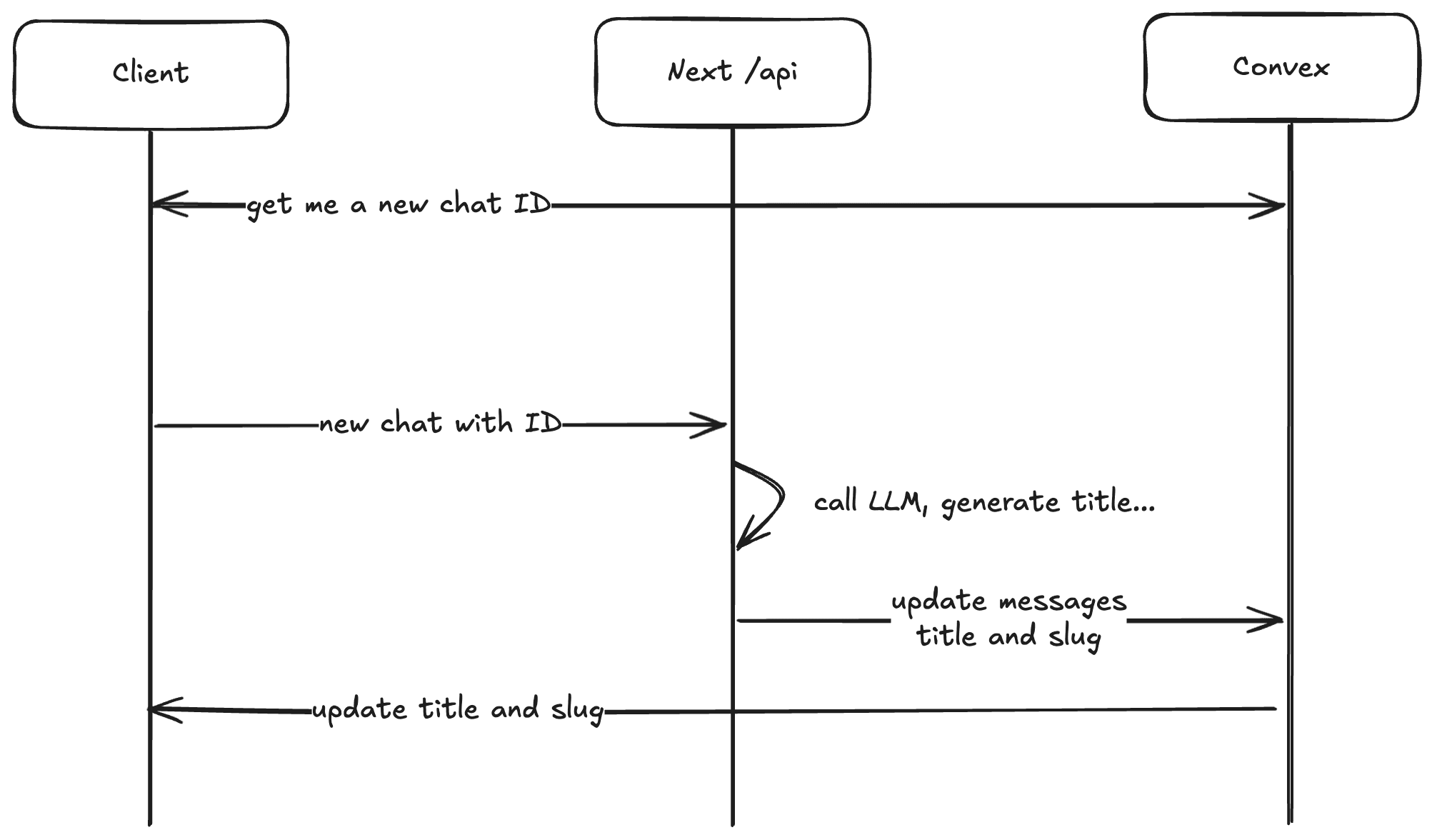
In most of the situations you should not trust the client. Trust creates a threat vector. In Karnet, each new chat gets a new ID, unique for you, and for the platform. I could have used UUID for that, and went the easy way of just trusting the client.
Instead I went the hard way : when you go on the new chat page, it instantly fires a “get new chat ID” request to the backend. I bet this request will land before you finished writing your question (if you are faster than 100ms, you should become the LLM).
Then, when you send your request on this “new chat”, I use the generated request.
This is the best way possible : Karnet does not have to trust any user input.
Finally, this pre-determined ID allows me to create a more readable, a smallId . Instead of having to share a nanoID id, you can use an ID made for humans like chat-42.
It’s only been a few weeks since I started working on Karnet. For now I think I created 60% of the features I want to implement in my app. As you may know, this last 40% will take much more time than the first 60%.
At the moment, the rich text editor is not perfect. There is a lot of potential in this part of the chat : having access to your last messages, ask a small LLM to reprompt your input, better copy and paste (image, code, files etc)
Better chat output visualization is also something I want to work on : avoiding the gray “thinking” pattern most chat interfaces implement by trying to have custom widgets per thinking mode.
I also want to add agentic features in the chat, this is yet to come…